Wednesday, March 3, 2010


From news article or internet information, find an example of an organization that is installing an ERP package. If possible get a copy of the over-all project plans and analyze the various activities and compare them with a standard SDLC.

Openbravo is an award-winning developer of professional open source solutions for businesses, offering the industry's first real alternative to proprietary enterprise software. The company's web-based Enterprise Resource Planning (ERP) and Point of Sale (PoS) solutions, the most popular in their market, have been downloaded more than 1.5 million times and are used in over 50 countries.
Openbravo ERP is a web-based business management system developed to help organizations streamline their daily operations and optimize back-office processes. The latest release, Openbravo ERP 2.50 Professional Subscription, introduced the concept of modularity, simplifying customization and the creation of third party add-ons. This makes it even easier for organizations to tailor their ERP system to their exact needs, while maintaining upgradability.
Openbravo ERP is now included in the Ubuntu partner repository, allowing Ubuntu users to add the software quickly and easily to their Ubuntu server. The newly created Openbravo ERP Professional Subscription for Ubuntu provides expert support and business continuity for the entire open source software stack, which includes the ERP software, operating system, application server and database.

What is ERP?
ERP (Enterprise Resource planning) covers the technique and concepts employed for the integrated management of business as a whole, from the viewpoint of the effectiveness use of management resources, to improve the efficiency of an enterprise. ERP packages are integrated software packages that support the above ERP concepts.
An Enterprise Resource Planning system (ERP) is a collection of modules/components integrated together while utilizing one database typically used primarily by medium to large manufacturing organizations with multiple sites located worldwide. Connecting to one database allows users from all departments of the organization located anywhere in the world to attain the necessary information to carry out their responsibilities. This integration approach offers improved operational processes and streamlined information to the fingertips of anyone with the security rights to access it. Paper documents are reduced or eliminated as online documents travel throughout the system to the appropriate department for updating and forwarding. Transactions pass through the system automatically updating several modules/components in real-time to provide timely and accurate data for users to access and share from any location in the world.

Phases of ERP Implementation Life Cycle

1. Pre-evaluation Screening
Once the company has decided to go for the ERP system, the search for the package must start as there are hundreds of packages it is always better to do a through and detailed evaluation of a small number of packages, than doing analysis of dozens of packages. This stage will be useful in eliminating those packages that are not suitable for the business process.

2. Package Evaluation
This stage is considered an important phases of the ERP implementation, as the package that one selects will decide the success or failure of the project. Implementation of an ERP involves huge investments and it is not easy to switch between different packages, so the right thing is ‘do it right the first time’. Once the packages to be evaluated are identified, the company needs to develop selection criteria that permit the evaluation of all the available packages on the same scale.

3. Project Planning
This is the phase that designs the implementation process. It is in this phase that the details of how to go about the implementation are decided. Time schedules deadlines, etc for the project are arrived at. The plan is developed, roles are identified and responsibilities are assigned. It will also decide when to begin the project, how to do it and it completion. A committee by the team leaders of each implementation group usually does such a planning.

4. Gap analysis
This is considered the most crucial phase for the success of ERP implementation. This is the process through which the companies create a complete model of where they are now, and in which direction will they opt in the future. It has been estimated that even the best packages will only meet 80% of the company’s requirements. The remaining 20% presents problematic issues for the company’s reengineering.

5. Reengineering
It is in this phase that human factors are taken into consideration. While every implementation is going to involve a significant change in number of employees and their job responsibilities, as the process becomes more automated and efficient, it is best to treat ERP as an investment as well as cost cutting measure.

6. Team training
Training is also an important phase in the implementation, which takes place along with the process of implementation. This is the phase where the company trains its employees to implement and later, run the system. Thus, it is vital for the company to choose the right employee who has the right attitude- people who are willing to change, learn new things and are not afraid of technology and a good functional knowledge.

7. Customization
This is the main functional area of ERP implementation. There is a bit of mystique around the customization process and for good reason: the Holy Grail of ERP implementation is synchronizing existing company practices with the package. In order to do so, business processes have to be understood and mapped in such a way that the arrived-at solutions match up with the overall goals of the company. But, companies cannot just shut down their operations while the mapping processes take place. Hence the prototype-a simulation of the actual business processes of the company-will be used. The prototype allows for through testing of the “to be” model in a controlled environment. As the ERP consultants configure and test the prototype, they attempt to solve any logistical problems inherent in the BPR before the actual go-live implementation.

8. Testing
This is the phase where one tries to break the system. One has reached a point where the company is testing the real case scenarios. The system is configured and now you must come up with extreme cases like system overloads, multiple users logging on at the same time, users entering invalid data, hackers trying to access restricted areas and so on. This phase is performed to find the weak link so that it can be rectified before its implementation.

9. Going Live
This is the phase where ERP is made available to the entire organization. On the technical side the work is almost complete: data conversion is done, databases are up and running and on the functional side, the prototype is fully configured and tested and ready to go operational. The system is officially proclaimed operational even though the implementation team must have been testing it and running it successfully for some time. But once the system is ‘live’ the old system is removed and the new system is used for doing business.

10. End-user Training
This is the phase where the actual users of the system will be given training on how to use the system. This phase starts much before the system goes live. The employees who are going to use the new system are identified. Their current skills are noted and they are divided into groups based on the current skill levels. Then each group is given training on the new system. This training is very important as the success of the ERP system is in the hands of the end-user. So, these training sessions should give the participants an overall view of the systems and how each person’s actions affect the entire system.

11. Post implementation
Once the implementation is over, the vendor and the hired consultants will go. To reap the fruit of the implementation it is very important that the system has wide acceptance. There should be enough employees who are trained to handle problems those crops up time to time. The system must be updated with the change in technology. The post implementation will need a different set of roles and skills than those with less integrated kind of systems. At a minimum, everyone who uses these systems needs to be trained on how they work, how they relate to business process and how a transaction ripples through the entire company whenever they press a key.
However, an organization can get the maximum value of these inputs if it successfully adopts and effectively uses the system.
-----------------------------------------------
System development life cycle. SDLC is the process of developing information systems through investigation, analysis, design, implementation and maintenance. SDLC is also known as information systems development or application development. SDLC is a systems approach to problem solving and is made up of several phases, each comprised of multiple steps:

• The software concept - identifies and defines a need for the new system

• A requirements analysis - analyzes the information needs of the end users

• The architectural design - creates a blueprint for the design with the necessary specifications for the hardware, software, people and data resources

• Coding and debugging - creates and programs the final system

• System testing - evaluates the system's actual functionality in relation to expected or intended functionality.

software development life cycle (SDLC) and also synonymous with software process as well as software engineering, it is a structured methodology used in the development of software products and packages. This methodology is used from the conception phase through to the delivery and end of life of a final software product. See under software engineering.


REFERENCE:
http://docs.google.com/viewer?a=v&q=cache:l5xlR5Ocv3sJ:www.ubuntu.com/system/files/Openbravo%2520Professional%2520Suscription%2520for%2520Ubuntu%25205%2520Aug%252009.pdf+organization+that+is+installing+an+ERP+package&hl=tl&gl=ph&pid=bl&srcid=ADGEESihjSMgxh6OsM6iF8qNeA820kBNhY7WNeJJGpdNavzHvTXQvMu7J9XL9cBVtNRrgTFpB8hZKXroM_VK7Y18iwVjhg9rdvQ6VtG8ZVGeZyy_8TimXEgc5wFY48m-kp2bfE7osbeF&sig=AHIEtbSHJvXdmj2SPENg7g9PfILdlaN0lg
http://www.docstoc.com/docs/5410205/ERP-Implementation
http://www.webopedia.com/TERM/S/SDLC.html
http://www.openbravo.com/about-us/

Characteristics examines when choosing or defining deployment environment

You were tasked by the IC-dean to evaluate the enrollment system of the university, list and briefly describe the characteristics that an analyst (you) examines when choosing or defining deployment environment.


One of the primary considerations in developing a new information system is the application deployment environment. The application deployment environment is the configuration of computer hardware, system software, and networks in which the new application software will operate. An important part of any project is ensuring that the application deployment environment is defined and well matched to application requirements. At this life cycle stage, the analyst’s goal is to define the environment in sufficient detail to be able to choose from among competing alternatives and to provide sufficient information for design to begin.

These are the characteristics examines when choosing or defining deployment environment:

Consider the configuration
Analysts consider the configuration of computer equipment, operating systems, and networks that will exist when the new application system is deployed.


Determine the constraints
The analyst must determine the constraints that are imposed on the system development alternatives.

Define Environment
The analyst must define an environment, or multiple environmental choices, that match application requirements

Define Application
The analyst must define the organization’s strategic application

Define Plans
The analyst must define technology architecture plans.

Determining Alternatives
Prioritizing the requirements is determining what alternatives are possible for developing the solution.


In sum, application deployment environment choices, particularly the operating system, DBMS, and distributed software standard, tend to limit development tool choices. Thus, an analyst should consider the deployment and development environments together when determining their fit to a particular application.


REFERENCE:
http://books.google.com.ph/books?id=-ot62DeCKO4C&pg=PA309&lpg=PA309&dq=characteristics+that+an+anlayst+examines+when+choosing+or+defining+deployment+environment&source=bl&ots=V0x_RrJEXy&sig=ps0TRNmjo8XOHg7SB59vcqAN7Ng&hl=tl&ei=VTSOS9S2O4SQtgPk4qnZCA&sa=X&oi=book_result&ct=result&resnum=2&ved=0CA0Q6AEwAQ#v=onepage&q=&f=false

Thursday, February 25, 2010

what characteristics does an analyst(you) examine when evalauating DFD quality?

With reference to assignments 8 and 9, what characteristics does an analyst(you) examine when evaluating DFD quality?


An analyst must know how to define every process on a Data flow diagram. He/ she must know how to keep braking down Data flow diagram to more detailed one. He/ she must understand the algorithm to be able to describe the process. He/ she must know how to decide. He/ she must identify the decision variable. He/ she must need to consider the number of locations of users, the processing and data access requirement, volume and timing of processing and access. He/ she must be able to translate the process into a diagram. He/ she must describe complex interactions and also alternative approaches. And also the systems-analyst author knows when he or she has reached the end.

But before I give details to the characteristics I examine when evaluating Data flow diagram, I would like to give some details what a Data flow diagram is. This is according to www.about-knowledge.com. Data flow diagram is a geographical tool that shows, process, flows, stores and external entities in a system. Data flow diagram shows the transformation of data into a system. Data flow diagram has got the following symbols. In Process flow diagrams, process symbol has got the following entities, process number (tells the number of the process), locality (where activity is happening) and a process name. Data flow datagram process symbol rules symbolizes the transformation of data. There must be data flowing into/out of the process. Process can have several inputs to it or output to it. Process with no out becomes a null process. Data store symbol consist of the following entities, data store number and name of data store. The function of data store is to designate the storage of data in a data flow diagram. Data flow symbol may appear in different shape and they signify the movement of data. They do not signify the movement of people, and goods. Doubles arrows signifies that activities occur at the same time which is wrong. Data flow in is never equal to data flow out. In Extended entity symbol, extended entity is sources and destination of data. This means that source is the origin and destination is the sink of data. There are Dos and Don’ts in external entity. External entity never communicate with each other, this signify that there is no need for the process. External entity should not communicate directly with data store because external entities can be identifier with the record of files and databases. There are two main types of analysis. The structured analysis and the object oriented analysis. The main phases of Structured Analysis are as follows: Requirements determination, structured modeling, Data modeling, and Alternative solution generation. The main phases of Object Oriented Analysis are as follows: Requirements determination, Object oriented modeling, Data modeling, and Alternative solution generation. The main sources from which the analyst can gather requirements are books, journals, people, current system documentation, websites, and articles. Break the business rules. For example, there is a rule that an organization can only use standalone system for all of its branches because of security reasons and an analyst can convince them to use online system having Internet securities.


According to Conrad Weisert, Information Disciplines, Inc., Chicago.
The elements of a Data flow datagram
A Data flow datagram contains four kinds of symbol:

1. Processes -- The only active elements. Processes cause something to happen. They have embedded descriptions, often in verb-object form. (Sometimes informally called "bubbles" because of their shape in an early version of SA.)
2. Terminators -- Represent users or other systems, i.e. entities outside the boundary of the system being described.
3. Data flows -- Composite data items (or objects) that pass either

From any element to a process (input dataflow) or from a process to any element (output dataflow)

4. Data stores -- Holding places for data flows; often implemented by databases.

Systems analysts apply this checklist to look for errors in their Data flow datagrams:

1. Every process must have at least one input dataflow (Violators are called "magic" processes, since they claim to do something based on no input, not even a trigger.)
2. Every process must have at least one output dataflow (Violators are called "black hole" processes, since their inputs are swallowed up for no reason.)
3. Every dataflow must connect two elements. One of them must be a process; the other can be a terminator, a data store or another process.
4. Each dataflow diagram should contain no more than six or seven processes and no more than six or seven data stores, and all the processes should be conceptually at the same level of detail. If a part of the system is too big or too complicated to describe in an easily grasped diagram, break it down into two or three lower-level diagrams. (We sometimes see hanging on an office wall a huge tour de force DFD that tries to describe an entire large system at a low level of detail with several dozen processes and convoluted intersecting dataflow arrows. That's not something to be proud of. It doesn't communicate to any audience.)
5. For every process, one of the following must eventually be true:
1. The description label is so simple and unambiguous that every reader will understand it in exactly the same way.
2. It is expanded or decomposed into a separate lower-level dataflow diagram that preserves exactly the same net inputs and outputs, but shows internal detail, such as data stores and internal processes.
3. It is rigorously described by a separate process specification (business rule, decision rule, function definition, algorithm, etc.).

The starting point: Context (level-0) diagram

The systems analyst begins by preparing the top-level DFD. This "context diagram" shows the entire system as a single process. Interactions with users and other external entities are shown as data flows.

The context diagram, although often almost trivially simple, serves two essential purposes:

* It clarifies to the user audience the analyst's understanding of the scope of the proposed system, the kinds of users the system will have, and the data coming out from and going into the system. A surprising number of misunderstandings are exposed at this early stage.
* It motivates and establishes a framework for the more complicated next level (below).

The system diagram (level-1 DFD)

After everyone agrees that the context diagram is correct and complete, the systems analyst examines the first-level breakdown of major functions. Most systems can be decomposed into between two and seven major areas.

The result is called the "system diagram&quot. It gives a clear overview of the system and serves as a base for further decomposition.

The end
The dataflow diagrams are complete when:

* Every process on every DFD complies with rule number 5 above.
* Every dataflow shown on every DFD is defined in the data dictionary.

There's more to come, but the remaining components of the system specification (or detailed user requirements documentation) have little or no effect on the functionality of the proposed system. Note that the information contained in these documents is essential not only as a foundation for building a custom application but also as a basis for evaluating and choosing a packaged application software product.


Analyst is the most responsible person for the new system project management and therefore he should possess and behaves the following characteristics. The analyst should: Question about every aspect of current and new system. Assume that every thing is possible and do not accept such sort of statements, "This is a routine operation to perform such type of job in our organization". Pay intension to each and every single answer because each answer could generate many important questions related to problems of current system. Restructure his mind before the development of each new system and do not correlate with previously developed systems. Have excellent communication skills. Identify and translate the problem of current system. Generate the maximum solution of the problem. Explain the logic of his solutions. Learn from mistakes. Not be bias to the customer or the software house for which he/she is working. In developing a physical data flow diagram, an analyst must explore the process for more details. Maintain consistency between the processes. Follow meaningful leveling convention. Ensure that data flow diagram clarifies what is happening in the system. Always remember data flow diagram audience. Evaluate data flow diagram for correctness. The system analyst must be able to communicate in writing and orally. The analyst must easily get along with people. The analyst must be a good listener and be able to react to what people say. The analyst must be knowledgeable of technology. The analyst is not expected to know the intricacies of programming, but a decent general knowledge of concepts and terms is essential. The analyst must be knowledgeable of business. The analyst is not expected to be an expert in business but a decent understanding of the client's world is required.


References:

http://www.docstoc.com/docs/16829052/ITEC-2010-Chapter-6---Data-Flow-Diagrams
http://www.about-knowledge.com/software-project-analysis-and-characteristics-of-an-analyst-and-types-of-analysis/
http://hubpages.com/hub/What-is-a-data-flow-diagram
http://www.idinews.com/life-cycle/dataflow.html

Monday, February 22, 2010

Create at least 3 different types of Data flow diagram of USEP's pre-enrollment system

-------------------------------------------------------------------------------------------


---------------------------------------------------------------------------------------------

Monday, February 8, 2010

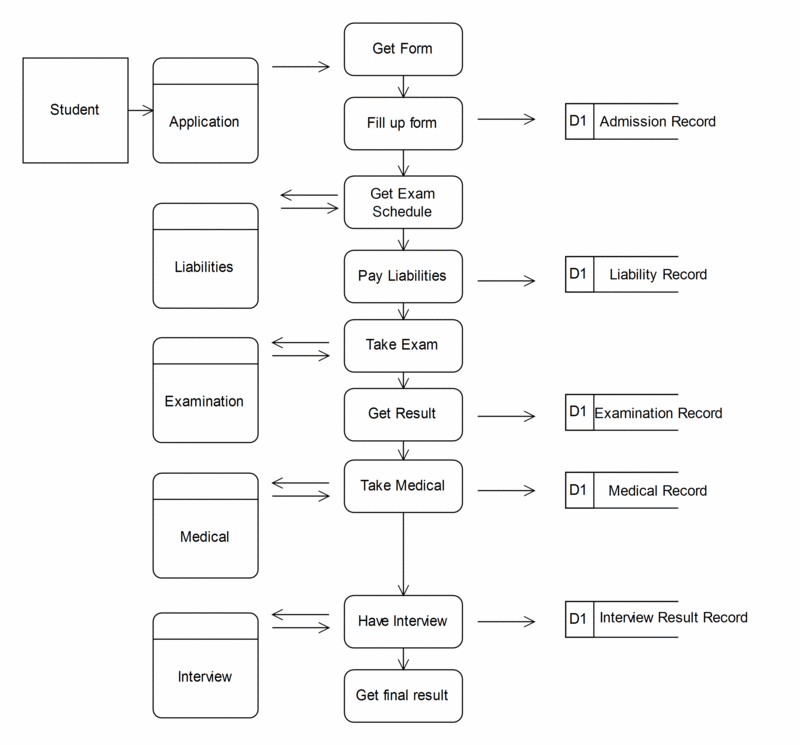
develop an activity diagram


This use case initiates when the applicant get an application form. The applicant fill up the form and that form will be check by the UGTO officer. When the form is accepted, the cashier will assess the applicant's liabilities. The applicant then pay the liabilities and receive a receipt and the schedule of the examination. When the examination day come, the exam applicant will have the examination, then the examination officer will check the examination papers. When the applicant pass the examination, the applicant will will have the medical examination. After that the applicant will proceed at the interview process. the interviewer will assess the applicants performance and submit the applicants' final assessment to the Dean. The Dean then finalize the List of Accepted Applicants.

Friday, January 29, 2010

dialogue between a systems professional

Consider the following dialogue between a systems professional, John Juan, and a manager of a department targeted for a new information system, Peter Pedro:

Juan: The way to go about the analysis is to first examine the old system, such as reviewing key documents and observing the workers perform their tasks. Then we can determine which aspects are working well and which should be preserved.

Pedro: We have been through these types of projects before and what always ends up happening is that we do not get the new system we are promised; we get a modified version of the old system.

Juan: Well, I can assure you that will not happen this time. We just want a thorough understanding of what is working well and what isn’t.

Pedro: I would feel much more comfortable if we first started with a list of our requirements. We should spend some time up-front determining exactly what we want the system to do for my department. Then you systems people can come in and determine what portions to salvage if you wish. Just don’t constrain us to the old system.

Required:

a. Obviously these two workers have different views on how the systems analysis phase should be conducted. Comment on whose position you sympathizes with the most.
b. What method would you propose they take? Why?

These two workers have different views; John Juan believe that the way to go about the analysis is to first examine the old system while Peter Pedro believes the way to go about the analysis is to first started with a list of our requirements. I sympathized more with John Juan. I also believe that in starting analysis phase it must start on analysis strategy then have an analysis plan then gather information like examine the old system, such as reviewing key documents and observing the workers perform their tasks also by conducting an interview with an expert and giving questionnaire to the users to be. Then analyze the old system then determine exactly what you want the system to do.

The analysis phase describes the requirements of the system; it describes all data, functional and behavioral requirements of the software under production or development. By having the requirements needed we must first observe to know what are needed. This phase defines the problem that the customer is trying to solve. The deliverable result at the end of this phase is a requirement document. Ideally, this document states in a clear and precise fashion what is to be built. This analysis answers the questions that start with what, that is connected with the system. The requirement document tries to capture the requirements from the customer's perspective by defining goals and interactions at a level removed from the implementation details. There are several factors that must be checked that would assure the quality of the software and the developed system itself. These factors include security, data integrity, usage difficulty and future upgrades. Analysis Strategy may be looked upon as the starting point of the strategic management process. It consists of the advance work that must be done in order to effectively formulate and implement strategies. Many strategies fail because managers may want to formulate and implement strategies without a careful analysis of the overarching goals of the organization and without a thorough analysis of its external and internal environment. Organizations must have clearly articulated goals and objectives in order to channel the efforts of individuals throughout the organization toward common ends. Goals and objectives also provide a means of allocating resources effectively.

In the analysis stage you must gather some data that you think could help you. But in gathering those data you should have techniques to follow and decide to have an interview and take note all the interviewee answered. For me it’s the most effective technique to have though it takes a lot of courage to perform it successfully.

In analysis phase they must apply a plan overview which I think could introduce what the system is all about, next is the Interview schedule which will handle the session for interview and followed by the Interview questions which contains questions and lastly the Interview transcripts are for the recording and approved documentations coming from the interviewee and lastly the Observation.

It’s difficult to build a solution if you don’t know the requirements (in spite of the fact that many teams still try to do it today). The “elicitation” step is where the requirements are first gathered from the client. Many techniques are available for gathering requirements. Each has value in certain circumstances, and in many cases, you need multiple techniques to gain a complete picture from a diverse set of clients and stakeholders.


Analysis phase aim is to discover problems with the system requirements and reach agreement on changes to satisfy all system stakeholders. It is a transition phase from problem understanding to solution specification. It is a set of requirements that are of high quality, having the following characteristics: unambiguous, complete, consistent, realistic, conform to business goals, verifiable, traceable, and required. Also all stakeholders must agree it. However, analysis is difficult, Identifying problems and understanding requirements’ implications is difficult. Most large software systems address wicked problems. Different stakeholders have different requirements and priorities. There is a constantly shifting compromise in defining the requirements. Therefore, requirements are normally both incomplete and inconsistent. Modeling is also part of analysis. Building an abstraction or what we called model of the problem enables us to answer questions about the system. Requirements collected during requirement elicitation are transformed into a model that describes the system. The development of models of the problem is fundamental to requirements analysis. Requirements analysis is a modeling activity. We build models so that, we can comprehend the problem better, to communicate with stakeholders, to deal with complexity and also to find errors or omissions. Several kinds of models that can be developed include: Data and control flows, State models, Event traces, User interactions and also Object models. One factors influencing the choice of models is the nature of the problem, like for example the control flow and state models are likely to be more important for real-time systems than for an information system. Another factor is the expertise of the requirements engineer, the process requirements of the customer, the availability of methods and tools. No single model is sufficient. Every nontrivial system is best approached.
Analysis Methods are methods for requirements analysis that are sometimes characterized by orientation. The Process or function-oriented is one of the analysis method, like the Classical structured analysis (SA), Structured analysis and design techniques (SADT) are one of the methods. Another method is the Data-oriented like the Entity-Relationship (ER) modeling. Another method is the Control-oriented like the Flowcharting. Another method is the Formal method like Z, VDM, and Object-Z. And lastly, the Object-oriented like OMT, Booch, UML is another method of analysis.

I propose that the method they will use is the Object oriented because it is easy to understand. The Object-Oriented Lifecycle is an Object-oriented approach that can be used with any lifecycle model. Object-oriented approaches encourage object evolution - analysis objects evolve into design objects, which evolve into implementation objects. Object evolution - simplifies trace ability and verification of implementation.
UML defines a notation a set of diagrams, the notation is the graphical stuff to build models; it is the concrete syntax of the modeling language, the meta-model defines the abstract syntax and the static and dynamic semantics of modeling concepts provided in UML Graphical notation for System structure and System behavior. It also covers multiple system views like Static structure (class/object/use case diagrams), Distribution structure (component/deployment diagrams), Interaction (sequence/collaboration diagrams), State change (state-charts), and Use cases/services (Use case/activity diagrams). It is also a tool for systematic development of component-oriented software architectures.
The Use Case Modeling Objectives is to define the functional and operational requirements of the system by defining a scenario of usage that is agreed upon by the end-user and the developer team. Also, to provide a clear and unambiguous description of how the end-user and the system interact. A use case presents a business functionality in many cases, a functional requirement maps directly to a use case. An actor represents whoever or whatever that interacts with a use case. Hence, use cases are determined from the analysis of: functional requirements, and the identification of actors and their tasks.

To summarize all, in analysis phase you must have an analysis strategy then have an analysis then gather information like examine the old system, such as reviewing key documents and observing the workers perform their tasks also by conducting an interview with an expert and giving questionnaire to the users to be. Then analyze the old system then determine exactly what you want the system to do. I propose that they will follow Object Oriented method. Object-oriented are specified and documented through process of building models. Modelling process starts with identification of use cases and problem domain classes or things in users’ work environment. I propose that they will use any of the following that fits the requirements; Use case model – a collection of models to capture system requirements. Use case diagram – identify actors and their roles and how the actor roles utilize the system. Activity diagram – a type of workflow diagram that describes the user activities and their sequential flow. Systems sequence diagrams (SSDs) – define inputs and outputs and sequence of interactions between user and system for a use case

Monday, December 21, 2009

Consider your school, how do you know that the life cycle was developed specifically for the university. How do we know it meets our needs?

Consider your school, how do you know that the life cycle was developed specifically for the university. How do we know it meets our needs?


Shown in the figure above is my own perspective of our university’s life cycle. One of the missions of the university is to produce world class graduates thus the university had formulated certain standards which are seen and reflected on the curriculum of each program. The starting point of the life cycle of our school is the formulation of a good curriculum. Formulation of a curriculum includes gathering of data and analysis of data. This phase produces a product which is called a curriculum. A curriculum is made to be a tool to achieve some of the Vision, Mission and Goals of our university. Any school or university needs a good curriculum to set its reputation as a premiere school. University personnel formulates a curriculum which they think meets the standard.

The next phase would probably the testing phase as I assume that all curriculum are tested to see if they really do meet standards. It would be a disgrace to implement a curriculum which is substandard. This is right as any product must undergo a testing first before releasing it to the public. As you can see on the figure above the testing phase is connected to two other phases which are the “Formulate Curriculum” phase and the “Implement Curriculum” phase. It illustrates that after formulating a possible good curriculum it would go undergo several in-depth testing. This is done to make sure that the curriculum is worthy enough to be implemented. Needless to say a bad curriculum is sent back to the initial phase as it again is analyzed and developed further.

The next phase is the implementation of the curriculum wherein students are enrolled in an academic program where the curriculum is used. Implementation of a certain curriculum takes a long time as an average curriculum lasts for four years. Implementation phase is where the data collected and analyzed during the formulation phase is used. If the implementation is successful therefore there is also a chance that world class graduates are also produced.

The next phase is the evaluation of the curriculum which I think is essential and important on the life cycle. This is the phase wherein a curriculum is evaluated and analyzed again to see if it still meets the need of the society and if it still in line with mission of the university. It is known that curriculum changes from time to time as the need of the society is changing. As technology advances there is a great need to reevaluate the curriculum to see if it still meets the standard. I personally believe that this phase is very crucial to the life cycle of this university because this is the phase wherein we realize the current curriculum is obsolete.

On the question, “How do you know that the life cycle was developed specifically for the university?” I think we could see it if it fits and relates to the Vision, Mission, and Goals of the university. A life cycle is made to achieve a certain goal or purpose. For example, when developing a system it also undergoes a certain life cycle which is specifically made for that certain project for the purpose of a certain end product which is a good system. I could say that the life cycle as I see it is made specifically for the university as it certainly aids to reach the goal or the purpose of the university.

How do we know it meets our needs? In my own idea, I think the current life cycle is still meeting our needs as the university is still producing world class graduates as reflected on examination passers and achievements of individuals who graduated from our university. As discussed earlier there is a certain limit on how long could it meet our needs because technology is fast advancing and so must our curriculum. A good curriculum is not only measured by the graduates it produces but also the timeliness or the relevance of the curriculum on the society. For example, past curriculum for Education programs does not include computer subjects but as technology advances the curriculum adapted to the society and was revised to include computer subjects in the curriculum.


USEP’s Roots

The University of Southeastern Philippines (USEP) is a regional state university created in 1978 through Batas Pambansa Bilang 12. The university is an integration of four state institutions, particularly, the Mindanao State University-Davao, the University of the Philippines-Master of Management Program in Davao, the Davao School of Arts and Trades, and the Davao National Regional Agricultural School.

The university has four campuses, namely, Obrero (main) and Mintal Campuses in Davao City, Tagum-Mabini Campus which has two units – one in Tagum City and one in Compostela Valley Province, and Bislig Campus in Surigao del Sur.

The USEP offers graduate and undergraduate academic programs in the fields of engineering, education, arts and sciences, economics, business, computing, governance, development, resource management, technology, agriculture and forestry.

The University of Southeastern Philippines has the following mandate:

To provide programs of instruction and professional training primarily in the fields of science and technology, especially medicine, fisheries, engineering and industrial fields.
To promote advanced studies, research and extension services and progressive leadership in science, agriculture, forestry, fisheries, engineering and industrial fields and other courses needed in the socio-economic development of Mindanao.

To develop courses at the graduate level along the fields of specialization and to respond to the needs of development workers in the academic community.

To provide non-formal education and undertake vigorous extension and research programs in food production, nutrition, health and sports development.
To offer scholarship and/or part-time job opportunities to deserving students from low-income families.

Mission

USEP shall produce world-class graduates
and relevant research and extension
through quality education and sustainable resource management.

Particularly, USEP is committed to:
Provide quality education for students to grow in knowledge, promote their well-rounded development, and make them globally competitive in the world of work;
Engage in high impact research, not only for knowledge’s sake, but also for its practical benefits to society; and,
Promote entrepreneurship and industry collaboration.

Vision

A PREMIER UNIVERSITY IN THE ASEAN REGION

By becoming a premier university in the ASEAN Region, the USEP shall be a center of excellence and development, responsive and adaptive to fast-changing environments. USEP shall also be known as the leading university in the country that fosters innovation and applies knowledge to create value towards social, economic, and technological developments.

Goals

Aligned with the university 's vision and mission are specific goals for Key Result Areas (KRA) on Instruction; Research, Development, and Extension; and Resource Management:

KRA 1. Instruction

Produce globally competitive and morally upright graduates

KRA 2. Research, Development, and Extension (RDE)

Develop a strong R,D,&E culture with competent human resource and responsive and relevant researches that are adopted and utilized for development

KRA 3. Resource Management


Resources:

usep.edu.ph

Identify and discuss at least 3 systems development models


Identify and discuss at least 3 systems development models


Software process models often represent a networked sequence of activities, objects, transformations, and events that embody strategies for accomplishing software evolution. Such models can be used to develop more precise and formalized descriptions of software life cycle activities. Their power emerges from their utilization of a sufficiently rich notation, syntax, or semantics, often suitable for computational processing.
Software process networks can be viewed as representing multiple interconnected task chains (Kling 1982, Garg 1989). Task chains represent a non-linear sequence of actions that structure and transform available computational objects (resources) into intermediate or finished products. Non-linearity implies that the sequence of actions may be non-deterministic, iterative, accommodate multiple/parallel alternatives, as well as partially ordered to account for incremental progress. Task actions in turn can be viewed a non-linear sequences of primitive actions which denote atomic units of computing work, such as a user's selection of a command or menu entry using a mouse or keyboard. Winograd and others have referred to these units of cooperative work between people and computers as "structured discourses of work" (Winograd 1986), while task chains have become popularized under the name of "workflow" (Bolcer 1998).

Task chains can be employed to characterize either prescriptive or descriptive action sequences. Prescriptive task chains are idealized plans of what actions should be accomplished, and in what order. For example, a task chain for the activity of object-oriented software design might include the following task actions:
_ Develop an informal narrative specification of the system.
_ Identify the objects and their attributes.
_ Identify the operations on the objects.
_ Identify the interfaces between objects, attributes, or operations.
_ Implement the operations.
Clearly, this sequence of actions could entail multiple iterations and non-procedural primitive action invocations in the course of incrementally progressing toward an object-oriented software design.
Task chains join or split into other task chains resulting in an overall production network or web (Kling 1982). The production web represents the "organizational production system" that transforms raw computational, cognitive, and other organizational resources into assembled, integrated and usable software systems. The production lattice therefore structures how a software system is developed, used, and maintained. However, prescriptive task chains and actions cannot be formally guaranteed to anticipate all possible circumstances or idiosyncratic foul-ups that can emerge in the real world of software development (Bendifallah 1989, Mi 1990). Thus, any software production web will in some way realize only an approximate or incomplete description of software development.


Waterfall
The classic software life cycle (or "waterfall chart") and stepwise refinement models are widely instantiated in just about all books on modern programming practices and software engineering. The incremental release model is closely related to industrial practices where it most often occurs. Military standards based models have also reified certain forms of the classic life cycle model into required practice for government contractors. Each of these four models uses coarse-grain or macroscopic characterizations when describing software evolution. The progressive steps of software evolution are often described as stages, such as requirements specification, preliminary design, and implementation; these usually have little or no further characterization other than a list of attributes that the product of such a stage should possess. Further, these models are independent of any organizational development setting, choice of programming language, software application domain, etc. In short, the traditional models are context-free rather than context-sensitive. But as all of these life cycle models have been in use for some time, we refer to them as the traditional models, and characterize each in turn.

The classic software life cycle is often represented as a simple prescriptive waterfall software phase model, where software evolution proceeds through an orderly sequence of transitions from one phase to the next in order (Royce 1970). Such models resemble finite state machine descriptions of software evolution. However, these models have been perhaps most useful in helping to structure, staff, and manage large software development projects in complex organizational settings, which was one of the primary purposes (Royce 1970, Boehm 1976). Alternatively, these classic models have been widely characterized as both poor descriptive and prescriptive models of how software development "in-the-small" or "in-the-large" can or should occur. Figure 1 provides a common view of the waterfall model for software development attributed to Royce (1970).

Waterfall
-Linear sequence of stages/phases
-Requirements – HLD – DD – Code – Test – Deploy
-A phase starts only when the previous has completed; no feedback
-The phases partition the project, each addressing a separate concern\
-Linear ordering implies each phase should have some output
-The output must be validated/certified
-Outputs of earlier phases: work products
-Common outputs of a waterfall: SRS, project plan, design docs, test plan and
reports, final code, supporting docs

-Linear ordering implies each phase should have some output
-The output must be validated/certified
-Outputs of earlier phases: work products
-Common outputs of a waterfall: SRS, project plan, design docs, test plan and reports, final code, supporting docs

-Conceptually simple, cleanly divides the problem into distinct phases that can be performed independently
-Natural approach for problem solving
-Easy to administer in a contractual setup – each phase is a milestone
-Has been used widely
-Well suited for projects where requirements can be understood easily and technology decisions are easy
-I.e. for familiar type of projects it still may be the most optimum

Strength
Simple, Easy to execute, Intuitive and logical, Easy contractually
Weakness
All or nothing – too, risky, Require frozen early, May chose outdated hardware/tech, Disallows changes, No feedback from users, Encourages requirements bloating
Types of Projects
Well understood problems, short duration projects, automation of existing manual systems

In Royce's original Waterfall model, the following phases are followed in order:

1. Requirements specification
2. Design
3. Construction (AKA implementation or coding)
4. Integration
5. Testing and debugging (AKA Validation)
6. Installation
7. Maintenance

To follow the waterfall model, one proceeds from one phase to the next in a purely sequential manner. For example, one first completes requirements specification, which are set in stone. When the requirements are fully completed, one proceeds to design. The software in question is designed and a blueprint is drawn for implementers (coders) to follow — this design should be a plan for implementing the requirements given. When the design is fully completed, an implementation of that design is made by coders. Towards the later stages of this implementation phase, separate software components produced are combined to introduce new functionality and reduced risk through the removal of errors.


Prototyping
Prototyping addresses the requirement specification limitation of waterfall. Instead of freezing requirements only by discussions, a prototype is built to understand the requirements. Helps alleviate the requirements risk. A small waterfall model replaces the requirements stage.
Development of prototype- Starts with initial requirements. Only key features which need better understanding are included in prototype. No point in including those features that are well understood. Feedback from users taken to improve the understanding of the requirements.
Cost can be kept low- Build only features needing clarification. “quick and dirty” – quality not important, scripting etc can be used. Things like exception handling, recovery, standards are omitted. Cost can be a few % of the total. Learning in prototype building will help in building, besides improved requirements.
Advantages: requirements will be more stable, requirements frozen later, experience helps in the main development.
Applicability: When required to elicit and confidence in reqs is low; i.e. where reqs are not well understood. Prototyping is a technique for providing a reduced functionality or a limited performance version of a software system early in its development (Balzer 1983, Budde 1984, Hekmatpour 1987). In contrast to the classic system life cycle, prototyping is an approach whereby more emphasis, activity, and processing are directed to the early stages of software development (requirements analysis and functional specification). In turn, prototyping can more directly accommodate early 10 user participation in determining, shaping, or evaluating emerging system functionality. Therefore, these up-front concentrations of effort, together with the use of prototyping technologies, seeks to trade-off or otherwise reduce downstream software design activities and iterations, as well as simplify the software implementation effort. (see Rapid Prototyping) Software prototypes come in different forms including throwaway prototypes, mock-ups, demonstration systems, quick-and-dirty prototypes, and incremental evolutionary prototypes (Hekmatpour 1987). Increasing functionality and subsequent evolvability is what distinguishes the prototype forms on this list. Prototyping technologies usually take some form of software functional specifications as their starting point or input, which in turn is simulated, analyzed, or directly executed. These technologies can allow developers to rapidly construct early or primitive versions of software systems that users can evaluate. User evaluations can then be incorporated as feedback to refine the emerging system specifications and designs. Further, depending on the prototyping technology, the complete working system can be developed through a continual revising/refining the input specifications. This has the advantage of always providing a working version of the emerging system, while redefining software design and testing activities to input specification refinement and execution. Alternatively, other prototyping approaches are best suited for developing throwaway or demonstration systems, or for building prototypes by reusing part/all of some existing software systems. Subsequently, it becomes clear why modern models of software development like the Spiral Model (described later) and the ISO 12207 expect that prototyping will be a common activity that facilitates the capture and refinement of software requirements, as well as overall software development.


Spiral Model
The Spiral Model. The spiral model of software development and evolution represents a riskdriven approach to software process analysis and structuring (Boehm 1987, Boehm et al, 1998). This approach, developed by Barry Boehm, incorporates elements of specification-driven, prototype-driven process methods, together with the classic software life cycle. It does so by representing iterative development cycles as an expanding spiral, with inner cycles denoting early system analysis and prototyping, and outer cycles denoting the classic software life cycle. The radial dimension denotes cumulative development costs, and the angular dimension denotes progress made in accomplishing each development spiral. See Figure 3. Risk analysis, which seeks to identify situations that might cause a development effort to fail or go over budget/schedule, occurs during each spiral cycle. In each cycle, it represents roughly the same amount of angular displacement, while the displaced sweep volume denotes increasing levels of effort required for risk analysis. System development in this model therefore spirals out only so far as needed according to the risk that must be managed. Alternatively, the spiral model indicates that the classic software life cycle model need only be followed when risks are greatest, and after early system prototyping as a way of reducing these risks, albeit at increased cost. The insights that the Spiral Model offered has in turned influenced the standard software life cycle process models, such as ISO12207 noted earlier. Finally, efforts are now in progress to integrate computer-based support for stakeholder negotiations and capture of trade-off rationales into an operational form of the WinWin Spiral Model (Boehm et al, 1998). (see Risk Management in Software Development)


(JAD)
Joint Application Development (JAD) is a technique for engaging a group or team of software developers, testers, customers, and prospective end-users in a collaborative requirements elicitation and prototyping effort (Wood and Silver 1995). JAD is quintessentially a technique for facilitating group interaction and collaboration. Consultants often employ JAD or external software system vendors who have been engaged to build a custom software system for use in a particular organizational setting. The JAD process is based on four ideas:
1.People who actually work at a job have the best understanding of that job.
2.People who are trained in software development have the best understanding of the
possibilities of that technology.
3. Software-based information systems and business processes rarely exist in isolation -- they transcend the confines of any single system or office and effect work in related departments. People working in these related areas have valuable insight on the role of a system within a larger community.
4.The best information systems are designed when all of these groups work together on a project as equal partners. Following these ideas, it should be possible for JAD to cover the complete development life cycle of a system. The JAD is usually a 3 to 6 month well-defined project, when systems can be constructed from commercially available software products that do not require extensive coding or complex systems integration. For large-scale projects, it is recommended that the project be organized as an incremental development effort, and that separate JAD's be used for each increment (Wood and Silver 1995). Given this formulation, it is possible to view open source software development projects that rely on group email discussions among globally distributed users and developers, together with Internet-based synchronized version updates (Fogel 1999, Mockus 2000), as an informal variant of JAD.


Timeboxing
- Iterative is linear sequence of iterations
- Each iteration is a mini waterfall – decide the specs, then plan the iteration
- Time boxing – fix an iteration duration, then determine the specs
- Divide iteration in a few equal stages
- Use pipelining concepts to execute iterations in parallel
- General iterative development – fix the functionality for each iteration, then plan and execute it
- In time boxed iterations – fix the duration of iteration and adjust the functionality to fit it
- Completion time is fixed, the functionality to be delivered is flexible
- This itself very useful in many situations
- Has predictable delivery times
- Overall product release and marketing can be better planned
- Makes time a non-negotiable parameter and helps focus attention on schedule
- Prevents requirements bloating
- Overall dev time is still unchanged
- What if we have multiple iterations executing in parallel
- Can reduce the average completion time by exploiting parallelism
- For parallel execution, can borrow pipelining concepts from hardware
- This leads to Timeboxing Process Model
- With this type of time boxes, can use pipelining to reduce cycle time
- Like hardware pipelining – view each iteration as an instruction
- As stages have dedicated teams, simultaneous execution of different iterations is possible
Advantages: Shortened delivery times, other adv of iterative, distr. execution
Applicability: When short delivery times v. imp.; architecture is stable; flexibility in feature grouping


RUP Model
- Rational Unified Process is another iterative model
- Software development is divided into cycles, each cycle delivering a fully working system
- Each cycle executed as separate project
- Execution of a cycle is broken into four consecutive phases, each phase ending with a milestone achievement
- Phases in a project
- Inception phase: ends with Lifecycle Objectives milestone; vision and high level capability of system defined
- Elaboration phase: Lifecycle architecture milestone; most requirements defined and architecture designed
- Construction phase: Initial operational capability milestone
- Transition phase: Product release; transition product from development to production
- Each phase itself can be done in multiple iterations, each iteration having an external/internal customer
- Generally construction has multiple iterations; elaboration can also be meaningfully done in multiple iterations
- Engineering tasks are called core process workflows
- These sub processes correspond to tasks of requirements, design, implementation, testing, project management, etc
- Many sub processes may be active in a phase, the volume of activity generally differs depending on the project
- Sub processes are active in all phases
- Volume of activity in each phase differs depending on the project
- Hence, a project can use RUP to implement waterfall by having requirements process be active only in the elaboration phase
- Or prototyping by having a lot of construction activity in the elaboration phase
- RUP is therefore a flexible framework

Strength
All benefits of iterative
Provides a flexible framework for a range of projects

Weakness
For each project, one has to design the process

Types of Projects
Can be applied to a wide range as it allows flexibility


Extreme Programming or Agile Process Model
- Agile approaches developed in 90s as a reaction to document driven approaches
- Most agile approaches have some common principles
- Working software is the measure of progress
- Software should be delivered in small increments
- Even late changes should be allowed
- Prefer face to face commn over documentation
- Continuous feedback and customer involvement is necessary
- Prefer simple design which evolves
- Delivery dates are decided by the empowered teams
- Many agile methodologies have been proposed; extreme programming (XP) is one of the most popular
- An XP project starts with user stories, which are short descr of user needs
- Details are not included
- Each user story written on a separate card so they can be combined in diff ways
- Team estimates how long it will take to implement a user story
- Estimates are rough
- Release planning is done
- Defines which stories are to be built in which release, and dates for release
- Frequent and small releases encouraged
- Acceptance tests also built from user stories; used to test before release
- Bugs found in AT are fixed in next release
- Development done in iterations of a few weeks each
- Iteration starts with planning, in which stories to be implemented are selected – high risk high value are chosen first
- Details of stories obtained during the development and implemented
- Failed AT of previous iteration are also fixed
- Well suited for situations where volume and pace of requirements is high
- Customer is willing to engage heavily with the team
- The team is collocated and is not too large (less than 20 or so)
- Requires strong capability in team members
Strength
Agile and responsive
Short delivery cycles
Continuous feedback can lead to better acceptance
Weakness
Can tend to become ad-hoc
Lack of documentation can be an issue
Continuous code change is risky
Types of Projects
Where requirements are changing a lot, customer is deeply engaged in development, and where the size of the project is not too large


References:
Process Models in Software Engineering
Walt Scacchi, Institute for Software Research, University of California, Irvine
February 2001

J.J. Marciniak (ed.), Encyclopedia of Software Engineering, 2nd
Edition, John Wiley and Sons, Inc, New York, December 2001.